AI Phone Answering After Hours: Evenings, Weekends and Holidays
Customers call when they have time — often after you have closed. How AI phone answering takes evening, weekend and holiday calls, books appointments and leaves everything ready for you the next working day.
Your customers call when they have time: after work, once the kids are in bed, on Sunday morning or in the middle of the summer holidays. Those are exactly the hours when nobody answers the phone at a small business. After-hours AI phone answering means an AI receptionist takes the calls you would otherwise miss — and you start the day with new bookings in your calendar and a summary of everything else.
What happens to your after-hours calls today?
Most small businesses use one of three options, and none of them is great:
- Voicemail. Many callers hang up without leaving a message, and those who do have to be called back the next day — by which time they may have booked elsewhere.
- The owner's mobile. The owner takes calls in the evening. It works until you are at the dinner table, on holiday or simply need time off.
- A human answering service. A friendly person on the line, but often with limited hours, surcharges for evenings and weekends, and usually just a message passed on to you. See the full comparison in AI receptionist vs. answering service.
How after-hours AI phone answering works
- You forward only when you are closed. You keep your number. With your phone provider you set forwarding on a schedule, when busy or when nobody answers after a few rings. During opening hours your team answers as usual.
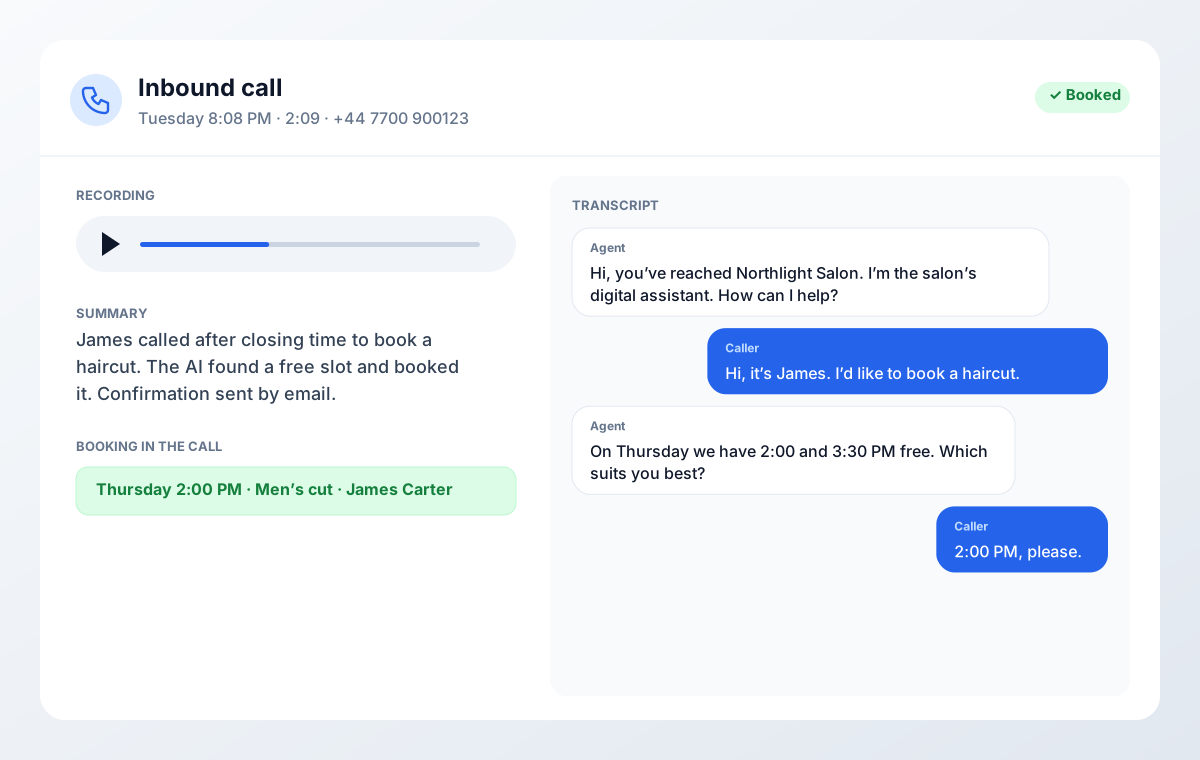
- The AI introduces itself honestly. "You are speaking with the salon's digital assistant — we are closed, but I can help you book or take a message." Customers expect it, and the EU AI Act (Article 50) requires it.
- It solves the request. It answers from your knowledge base (opening hours, prices, address, services), finds a free slot and books straight into Google Calendar, Outlook or Cal.com. It can also move and cancel existing appointments after checking who is calling.
- It takes care of the rest. Anything that needs you — a quote, a complaint, a question about an ongoing job — becomes a message with name, number and a short summary.
- You read it all the next morning. Every call is in the dashboard with recording, transcript and summary, so you can decide who to call back first.
Evenings, weekends and holidays: three different needs
Weekday evenings
This is when people call who can't call from work: patients booking a physiotherapist, customers wanting a Saturday haircut, homeowners who finally have time to contact a carpenter. The requests are mostly bookings and simple questions — exactly what an AI receptionist handles best.
Weekends
At weekends more calls are about something that broke, or about appointments in the coming week. Let the AI book and take messages, and decide in advance what is so urgent it can't wait until Monday (see below).
Holidays and the summer shutdown
Easter, Christmas and the weeks in summer when much of the country is off. Update the greeting and knowledge base with your holiday dates, so the AI tells callers when you are back and only books appointments after the break. Customers get an answer instead of a phone ringing into nothing.
Create a free account, forward your number and let the AI take real calls for 7 days. No credit card.
What the AI should handle — and what can wait
| After-hours request | The AI | You, next working day |
|---|---|---|
| New booking | Finds a free slot and books | Nothing — it's in the calendar |
| Move or cancel | Checks who is calling, moves or cancels | Nothing |
| Questions on prices, address, services | Answers from the knowledge base | Nothing |
| Quote or larger job | Collects details and takes a message | Call back with a quote |
| Complaint | Listens, takes a message, promises a call | Call back yourself |
| Urgent issue | Follows your urgent-call rule | Depends on the rule |
Urgent calls: set a clear rule
The most important decision for after-hours answering is what happens to things that can't wait. Write it into the AI's instructions so it never has to guess:
- Tradespeople with an on-call rota: water damage and power failures go to the on-call phone or are flagged "urgent" with a message to whoever is on call. Everything else is booked or noted for Monday.
- Clinics: the AI never gives medical advice. For acute symptoms it refers callers to the out-of-hours doctor or the emergency number 112.
- Shops and webshops: almost nothing is urgent. The AI answers, takes messages and says when you open.
Read more about when the AI should hand over to a person.
See how the AI Voice Widget, AI phone answering and outbound calls work together — with an example from a whole week.
Setup step by step
- Write the greeting so it says you are closed and what the AI can help with.
- Fill the knowledge base with opening hours, holiday dates, prices and the questions customers ask — as text, from your website or as a PDF.
- Connect the calendar (Google Calendar, Outlook/Microsoft 365 or Cal.com) so the AI only sees free slots.
- Decide the urgent-call rule from the section above.
- Set up forwarding with your phone provider: outside opening hours, when busy or after, say, four rings.
- Call yourself one evening and test with your customers' typical requests. Adjust, and repeat after the first week.
What does after-hours AI phone answering cost?
At Aibooking.dk you pay for talk time, not for the time of day. There are no evening or weekend surcharges. Starter costs DKK 999 per month for 150 minutes of talk time. An example: 40 after-hours calls a month at about two minutes each comes to 80 minutes — within Starter. You can try it free for 7 days on your own number. See all packages in what an AI receptionist costs, and read the nine requirements for AI phone answering before you choose a provider.
Sources
- Forordning (EU) 2024/1689 om kunstig intelligens (AI-forordningen), artikel 50 — EUR-Lex, 2024-07-12
Ready to put AI to work?
Get an AI widget on your website, an AI receptionist on the phone and automated customer service for your webshop — in one solution. Try it free for 7 days, no credit card required.
Explore our AI solutions
Next step: AI phone answering on your own number
To see how this article plays out on your own calls, you can set up AI phone answering in an afternoon: write the greeting, connect the calendar and forward your number when you close.
During the trial the dashboard shows which calls the AI took and what it booked.