AI receptionist for your website and phone
AI Voice Widget, AI phone answering and outbound calls in one solution
Your AI receptionist answers customers on your website, picks up the phone when your team can’t and, as an add-on, calls customers itself. It books straight into your calendar and keeps every conversation in one dashboard.
You're booked for tomorrow at 8:30 AM. You'll get a confirmation by email right away.
Hear our AI answer the call and book an appointment
It’s easy to promise a good AI voice — it’s better to hear one. Here is an example of a call where a customer phones in and the AI handles the whole conversation and the booking. Press play and hear the quality.
- Natural, fluent speech — no robot voice
- Understands what the caller needs and asks the right follow-up questions
- Finds a free slot and books it straight into the calendar
The example call is in Danish. The AI also answers in English and other languages.
One AI receptionist on your website and on the phone
The Aibooking.dk AI receptionist meets customers where they reach out: first on your website with the AI Voice Widget, then on the phone when they call, and, as an add-on, with outbound calls. All three channels share the same knowledge, the same calendar and the same dashboard.
AI Voice Widget: the receptionist on your website
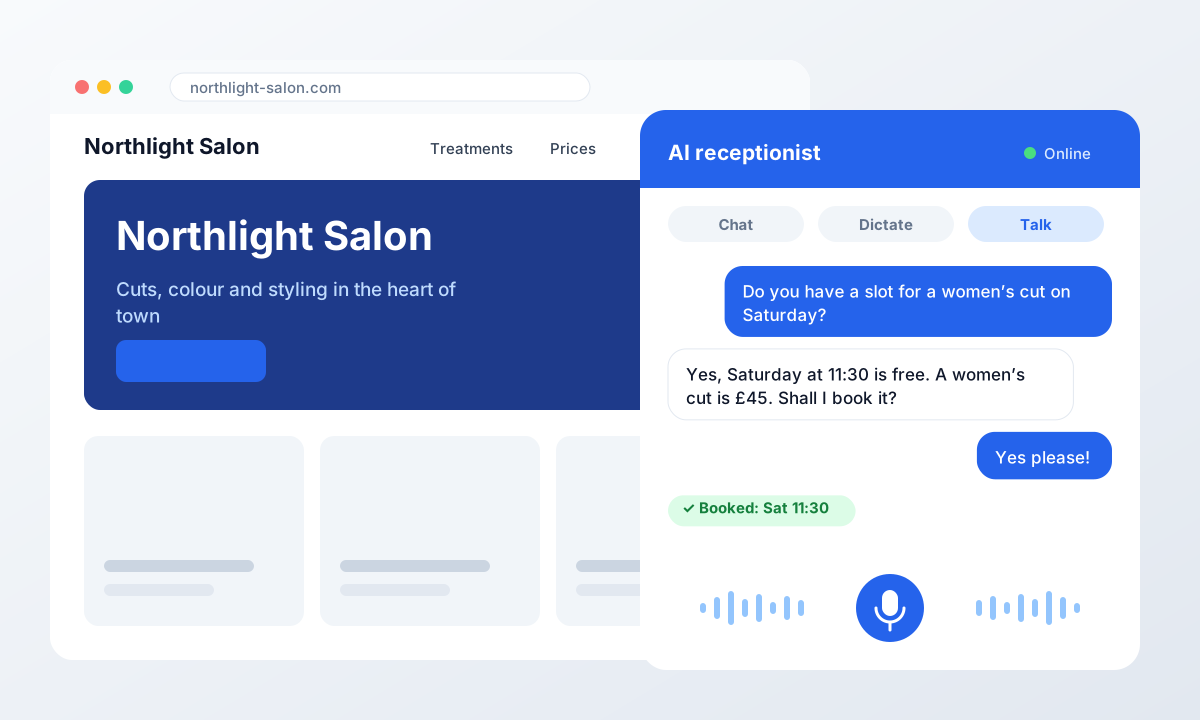
Most customers find you on your website first — often in the evening, after you have closed. The AI Voice Widget answers them instantly, by text, dictation or a real spoken conversation in the browser, and books the appointment straight into your calendar while interest is at its peak.
- Chat, dictation and real-time voice in one widget
- Answers from your knowledge base: text, website or PDF
- Books, moves and cancels in Google Calendar, Outlook or Cal.com
- Added with a single script to any kind of website
AI phone answering for inbound calls
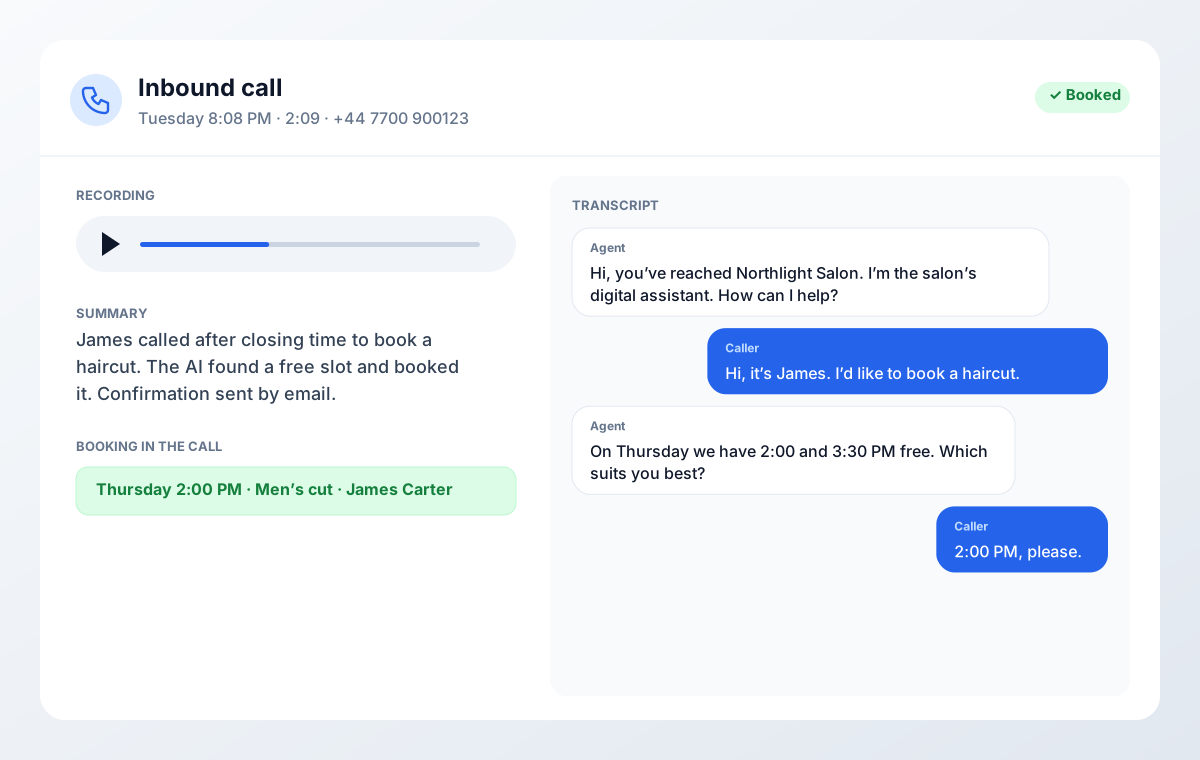
When a customer calls, the AI receptionist answers on your own number. It introduces itself as a digital assistant, understands the request, answers questions and books — even when the line is busy, at lunch and after closing time.
- Keep your number — forward always, after hours or when busy
- Many calls at once, no phone queue
- Recording, transcript and summary of every call
- Conversations in English, Danish, German, Spanish, French or Portuguese
Outbound AI calls when you want to reach out
With the outbound add-on, the AI calls out from a list you upload: customers who haven't booked in a while, leads who asked to be contacted, or follow-ups on a quote — within the time windows you choose.
- Campaigns from your own customer lists
- Call windows, so calls only go out at suitable times
- Same voice, knowledge and calendar as inbound calls
Outbound calling is a separate add-on with its own price and runs in its own module.
Widget, phone and outbound calls in one solution — an example
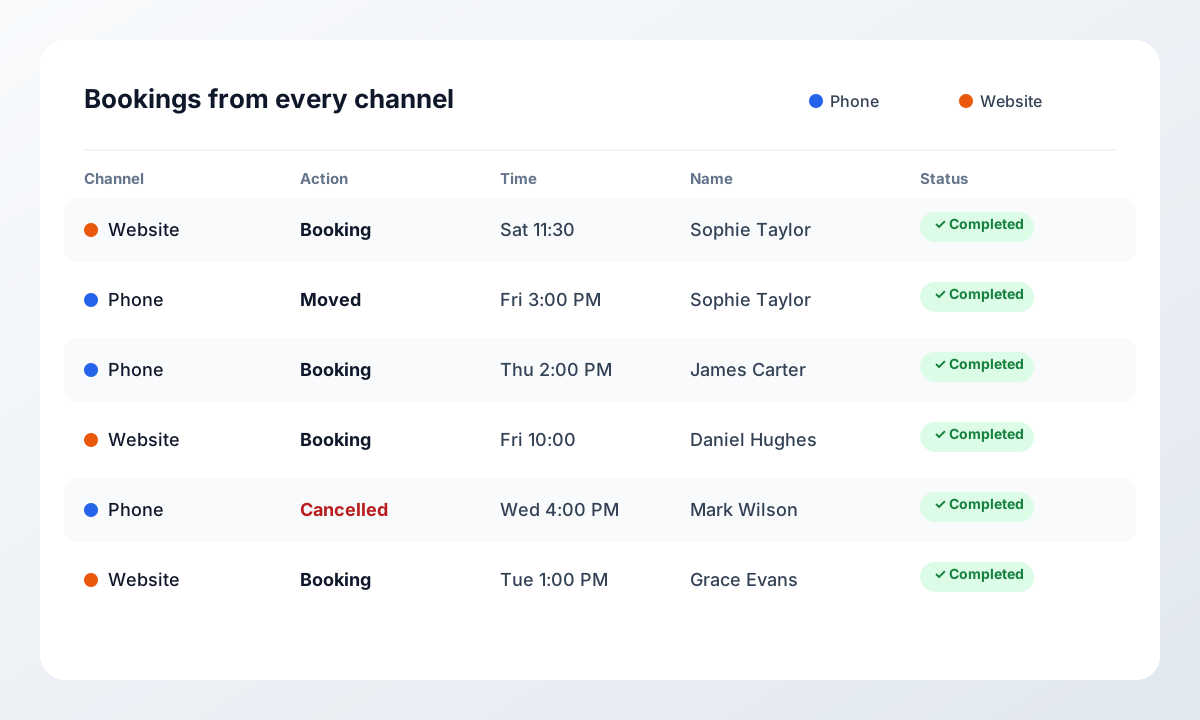
Here is a week at a hair salon that uses the whole AI receptionist. The customer switches channels along the way, but the AI follows her throughout, because everything is gathered in one place.
- Monday, 9:40 PM · AI Voice Widget
Sophie books on the website
Sophie asks the widget what a women's cut costs and whether there is a slot on Saturday. The widget answers from the salon's price list and books Saturday at 11:30. The confirmation arrives straight away by email.
- Wednesday, 12:15 PM · Inbound call
She calls to move the appointment
Every stylist is with a client, so the AI receptionist takes the call. It finds Sophie's booking, checks it is really her and moves it to Friday at 3:00 PM.
- Thursday, 10:00 AM · Outbound call (add-on)
The salon reaches out
An outbound campaign calls customers who haven't visited in more than two months and offers them a free slot next week.
- Friday, 8:00 AM · Dashboard
The owner sees it all in one place
Bookings from both the widget and the phone are in the calendar. The dashboard holds every conversation with recording, transcript and summary — no sticky notes, no lost messages.
One knowledge base
Update prices and opening hours once, and the widget and phone give the same answers.
One calendar
No double bookings, whether the customer types, talks or calls.
One overview
Every conversation and booking from every channel in the same dashboard and app.
What a real call sounds like
Two actual conversations – one inbound, one outbound. Word for word as the AI runs them, along with everything it handled along the way.
8:41 PM, an hour and a half after closing. Normally this call would hit voicemail – and the customer would move on to the next plumber on the list.
What the AI handled along the way
- Answered in two seconds – an hour and a half after closing
- Assessed whether the job was urgent and picked the right job type
- Found an open slot in the right engineer's calendar
- Logged the address and phone number straight onto the job
- Sent the confirmation and scheduled the reminder automatically
Result
- Duration
- 1:04
- Outcome
- Booked tomorrow at 8:30 AM
- Job created
- #4821 · Dripping water pipe
And here's what it looks like afterwards
Every call lands in your dashboard with duration, status and outcome. This is one month at a dental clinic running four agents.
Dashboard
Track how your AI agents perform on the phone and on your website
Recent conversations
| Agent | Date | Status | Minutes | |
|---|---|---|---|---|
Widget – home page Widget | 26 Aug 2026, 21:12 | Completed | 0.47 | View conversation |
Reception – after hours Phone | 26 Aug 2026, 20:41 | Completed | 1.04 | View conversation |
Reminders – day before Phone | 26 Aug 2026, 09:15 | Completed | 0.38 | View conversation |
Reception – main line Phone | 25 Aug 2026, 14:22 | Completed | 2.11 | View conversation |
Widget – booking page Widget | 25 Aug 2026, 16:05 | Completed | 1.12 | View conversation |
Rebooking – cancellations Phone | 25 Aug 2026, 11:03 | Completed | 0.52 | View conversation |
Reception – main line Phone | 25 Aug 2026, 08:47 | Live | 0.19 | View conversation |
Active agents
- Reception – main line
- Reception – after hours
- Reminders – day before
- Rebooking – cancellations
- Widget – website
Bookings
- Fri 09:30Emma HansenHygiene visit
- Fri 11:00Jonas BakCheck-up
- Mon 08:15Aisha KarimEmergency slot
Illustrative figures from a demo clinic – your own dashboard shows your agents, your widget conversations and your calls.
How you get started
From the first conversation to a live AI voice usually takes less than a week.
We connect your number
You keep your current phone number. We set up forwarding so the AI takes exactly the calls you choose – all of them, only outside opening hours, or only when the line is busy.
The AI learns your business
We train it on your services, prices, opening hours and the questions your customers actually ask. You approve the wording before it goes live.
Calendar and systems connect
Google Calendar, Outlook or your industry system. The AI only books slots that are genuinely free, and writes the appointment into the same place you always use.
You follow along in the dashboard
Every call is recorded, transcribed and summarised. You can always go back and see exactly what was said and agreed.
What the AI voice can do
Everything it takes to keep the phone covered – in both directions.
Answers every incoming call
Picks up within seconds, understands what the customer is calling about, books appointments and answers the recurring questions. No customer ends up in voicemail.
Calls your customers itself
Confirmations, day-before reminders, follow-ups on quotes and rebooking of cancelled slots – dialled automatically, in your name and in your words.
Natural conversation
Understands ordinary speech, accents and interruptions. Customers don't press 1 for booking – they just talk, the way they would to a person.
Unlimited simultaneous calls
Five customers can call at once without anyone queuing. You pay for talk time, not for capacity, so a busy morning doesn't cost extra.
Books straight into your calendar
Synced with Google Calendar, Outlook and the common industry systems. The AI only sees slots that are genuinely free – no double bookings.
Email and SMS confirmation
The customer gets the time and details by email as a calendar invitation and can also get an SMS, so the appointment isn't forgotten.
Recording, summary and transcript
Every call is stored with a full transcript and a short summary of what was agreed. You can always document the conversation afterwards.
Transfers or takes a message
The AI recognises the cases it shouldn't decide – complaints, emergencies, negotiations – and transfers to the right colleague or takes a message with name, number and a short summary.
GDPR and data security
Data is processed in the EU with encrypted storage, agreed deletion rules and a data processing agreement. Recordings and transcripts are yours alone.
Who uses it for what
The same two directions solve very different problems depending on the industry.
Clinics and dentists
Inbound: booking and rebooking without interrupting the front desk. Outbound: day-before reminders and a new slot for anyone who cancels. This is where no-shows drop the most.
Tradespeople and installers
Inbound: calls get answered while your hands are inside an installation. Outbound: confirmation of tomorrow's visits and a heads-up if the engineer is running late.
Sales and lead follow-up
Outbound: call new leads within minutes, qualify the need and book the meeting straight into the rep's calendar while the interest is still warm.
Customer service and support
Inbound: take the top off the call volume with the questions that repeat – order status, opening hours, prices – and pass the rest on with context.
Webshops and e-commerce
Outbound: call on failed payments or uncollected parcels. Inbound: answer delivery and returns questions without hold time in peak season.
Offices and professional services
Inbound: a professional welcome for client calls, with messages taken and meetings booked. Outbound: confirming appointments and following up on documents sent.
Inbound or outbound – what do you need?
Most businesses start with one direction and switch the other on later. Same number, same voice.
| Task | Inbound | Outbound |
|---|---|---|
| Answering calls from customers | ||
| Calling customers | ||
| Booking appointments in the calendar | ||
| Capturing customer details | ||
| Day-before reminders | ||
| Following up on leads and quotes | ||
| Answering recurring questions | ||
| Message with a summary for the team | ||
| Rebooking a cancelled slot | ||
| Recording and summary |
AI receptionist vs. voicemail and answering services
What do you actually get for your money? A short, honest comparison of the three most common ways to handle calls when nobody can answer.
| AI receptionist | Voicemail | Human answering service | |
|---|---|---|---|
| Answers evenings, weekends and holidays | Yes, no surcharge | Only a recorded message | Depends on the contract, often with a surcharge |
| Books straight into the calendar | Yes | No | Rarely, usually a message |
| Several calls at the same time | Yes | Messages only | Depends on staffing |
| Same assistant on your website | Yes, AI Voice Widget | No | No |
| Recording, transcript and summary | Yes, in the dashboard | Audio file only | A written message |
| Pricing model | Package with talk time, from DKK 999/month | Usually part of the phone plan | Per call or a fixed monthly fee |
Pricing
Talk time and every feature are included. No lock-in, no setup fee.
Every plan includes inbound calls, the AI widget, calendar integration and recording. Outbound calling is an add-on.
Frequently asked questions
What we're asked most often before an AI voice goes live.
What is an AI receptionist?
Do I need both the widget and the phone?
What is an AI answering service?
What is the difference between inbound and outbound calls?
Can I keep my current phone number?
How many calls can it handle at once?
Can customers tell it's an AI?
What happens if the AI can't help?
Is automated outbound calling legal?
Does it work in languages other than English?
What does it cost compared to a receptionist?
How long does setup take?
Hear your own AI voice before you decide
We'll set up a demo with your services and your opening hours, so you can call in and hear exactly how it answers your customers.
AI Voice Widget: your digital receptionist – ready 24/7
Our primary solution is the AI Voice Widget – an AI-powered voice assistant that lives directly on your website and handles the customer conversation from the first question to a confirmed booking. The widget can even book a viewing appointment directly through the conversation.
Answers general questions
Responds quickly and accurately to customers' general questions about your business, opening hours and services.
Books and reschedules appointments
Finds available times and books or reschedules appointments instantly – without customers waiting for a callback.
Books meetings directly in your calendar
Books meetings – including viewings – directly in the company calendar, synced in real time.
Answers questions about products and services
Gives customers detailed answers about your products and services, so they get the information they need right away.
Helps webshops with sales and orders
Supports webshops with sales and order inquiries, so customers get answers while purchase intent is high.
Answers questions about delivery and orders
Gives customers status updates and answers to questions about products, delivery and existing orders.
Guides customers toward a purchase
Confidently leads customers through the sales process and helps them take the next step toward a purchase.
Handles inquiries around the clock
Always available, handling customer inquiries 24 hours a day, 7 days a week – even when the office is closed.
Whatever your industry, the AI Voice Widget is the core of your customer experience – one solution that answers, books and guides your customers all the way.
Manage AIbooking from your phone
Log in with your AIbooking account in the app and keep track of your AI receptionist wherever you are.
- The same login as on your computer
- See calls, conversations and bookings instantly
- Works on both iPhone and Android

Scan with your phone's camera to get the app
Guides and answers
In-depth articles on the questions our customers ask most before they get started.
Why choose AI phone answering over voicemail?
Voicemail asks the customer to wait. AI phone answering resolves the request there and then: it understands what the caller wants, answers questions, finds a free slot and confirms the booking while they are still on the line.
You choose whether the AI takes every call, only after hours or only when the line is busy. No evening or weekend surcharges — you pay for talk time.